Anatomy of an Ultrasound Image Explained

November 5, 2025

Ever stared at an ultrasound image and thought, “What am I actually looking at?” You’re not alone. These grainy, black-and-white images can be confusing even when someone points directly at the baby.

I’ve spent a lot of time studying ultrasound images, and I’m going to break down every element you see—from the technical information in the corners to the shadowy shapes in the middle. By the end of this guide, you’ll be able to read an ultrasound like a pro.

Quick Overview: What You’re Looking At

An ultrasound image is essentially a picture created by sound waves bouncing off tissues inside the body. Different tissues reflect sound differently, creating the various shades of gray you see:

  • Black areas = Fluid (like amniotic fluid) — sound passes right through
  • Dark gray areas = Soft tissues with high water content
  • Light gray areas = Denser soft tissues
  • White/bright areas = Bones and dense structures — sound bounces back strongly

Think of it like an echo. The harder the surface, the stronger the echo comes back. Bones create a strong “echo” (appearing white), while fluid creates almost none (appearing black).

Pro Tip: When looking at an ultrasound, the top of the image is closest to the ultrasound probe (and the skin surface), while the bottom is deeper inside the body. This orientation trips up a lot of first-time viewers.

The Display Elements Explained

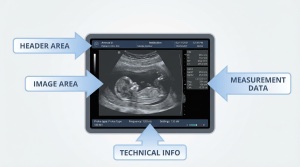
Before we even get to the baby, let’s decode all that text and information around the edges of the ultrasound image.

Header Information (Top of Image)

At the top, you’ll typically find:

Element What It Means Example
Facility Name Hospital or clinic where scan was performed Memorial Women’s Center
Patient Name/ID Patient identification (often abbreviated for privacy) SMITH, J or MRN: 12345
Date/Time When the scan was performed 03/15/2024 10:32:15
GA (Gestational Age) How far along the pregnancy is GA: 12w3d (12 weeks, 3 days)
EDD Estimated Due Date EDD: 09/21/2024

Technical Information (Sides/Bottom)

Around the edges, you might see:

  • MI (Mechanical Index) — Safety measurement for the ultrasound intensity
  • TI (Thermal Index) — Another safety parameter measuring heat potential
  • Depth scale — Usually on the right side, showing centimeters from the probe
  • Frequency (MHz) — The probe frequency being used
  • Gain settings — How much the return signal is amplified

Measurement Markers

You’ll often see dotted lines, plus signs (+), or “x” marks on the image. These are measurement calipers placed by the sonographer to measure specific structures. The measurements appear nearby, usually abbreviated (more on these below).

Breaking Down the Image Components

Now let’s look at what’s actually in the ultrasound image itself.

The Black Background (Amniotic Fluid)

The large dark area surrounding the baby is the amniotic fluid. Sound waves pass right through fluid without bouncing back, so it appears black. This provides nice contrast that makes the baby easier to see.

The Gestational Sac

In early pregnancy (before 10-12 weeks), you’ll see the gestational sac—a round or oval black area with a white rim. This is the fluid-filled structure that contains the embryo. The white rim is the developing placenta and uterine tissue.

The Yolk Sac

In very early scans (5-10 weeks), there’s a small white ring visible inside the gestational sac. This is the yolk sac, which provides nutrition to the embryo before the placenta takes over. It’s often one of the first visible signs of a viable pregnancy.

The Placenta

The placenta appears as a thick, granular-looking mass of gray tissue, usually attached to one wall of the uterus. Its location (anterior/front, posterior/back, fundal/top, or low-lying) is often noted on the scan.

The Umbilical Cord

Look for a twisted or coiled structure connecting the baby to the placenta. On 2D ultrasound, it often appears as two small circles side by side (cross-section) or a wavy line. A healthy cord has three vessels: two arteries and one vein.

Fetal Anatomy by Developmental Stage

What you can see on an ultrasound changes dramatically as the pregnancy progresses. Here’s what to expect at different stages.

First Trimester (Weeks 5-13)

5-6 Weeks: You’ll mainly see the gestational sac—a small black circle. The embryo is tiny and may not be visible yet, or might appear as a small bright spot.

7-8 Weeks: The embryo becomes visible as a small bright shape. You might see a flickering motion—that’s the heartbeat! The embryo looks like a small blob at this stage, sometimes called the “gummy bear” phase.

9-10 Weeks: Limb buds (early arms and legs) become visible. The head and body are distinguishable, though the baby still looks quite alien-like.

11-13 Weeks: This is the nuchal translucency scan window. You can now see:

  • Clear head shape with developing skull
  • Nasal bone
  • Arms and legs with visible movement
  • The spine as a bright line
  • Profile view of the face

Second Trimester (Weeks 14-27)

This is when ultrasounds get really interesting. The anatomy scan (usually 18-22 weeks) examines:

Head structures:

  • Brain ventricles (fluid-filled spaces)
  • Cerebellum (looks like a butterfly or dumbbell)
  • Face profile, lips, nose
  • Eye orbits

Spine:

  • Appears as two parallel bright lines from behind
  • Individual vertebrae may be visible
  • Checked for any openings or defects

Heart:

  • Four chambers should be visible
  • Appears as a small structure with fluttering movement
  • Takes up about 1/3 of the chest

Abdomen:

  • Stomach (black bubble on the left side)
  • Kidneys (two oval shapes)
  • Bladder (small black circle in the pelvis)
  • Umbilical cord insertion point

Limbs:

  • All four limbs with hands and feet
  • Individual fingers and toes may be countable
  • Long bones measured (femur, humerus)
Pro Tip: Gender can typically be determined after 18-20 weeks on standard 2D ultrasound, though some skilled technicians can make educated guesses earlier. The accuracy depends on the baby’s position and cooperation!

Third Trimester (Weeks 28-40)

By now, the baby is getting crowded in there. You’ll see:

  • Less full-body views (baby’s too big to fit in one frame)
  • Detailed face shots including expressions
  • Practice breathing movements
  • Hair on the head (appears as a fuzzy outline)
  • Fat deposits making the face and body look rounder

Common Measurement Terms Decoded

Those abbreviations on ultrasounds can be confusing. Here’s your cheat sheet:

Abbreviation Full Term What It Measures
CRL Crown-Rump Length Top of head to bottom of buttocks (used early pregnancy)
BPD Biparietal Diameter Width of head from side to side
HC Head Circumference Distance around the head
AC Abdominal Circumference Distance around the belly
FL Femur Length Length of the thigh bone
HL Humerus Length Length of the upper arm bone
NT Nuchal Translucency Fluid at back of baby’s neck (screening measurement)
AFI Amniotic Fluid Index Amount of fluid around baby
EFW Estimated Fetal Weight Calculated weight based on measurements
FHR Fetal Heart Rate Baby’s heartbeats per minute

These measurements help determine if the baby is growing properly and can confirm or adjust the due date. They’re also essential for understanding whether a fake ultrasound looks realistic—the measurements need to match the stated gestational age.

Different Types of Ultrasound Images

Not all ultrasounds look the same. Here are the different types you might encounter:

2D Ultrasound (Standard)

The classic black-and-white image. This is what most people picture when they think of ultrasounds. It shows a flat, two-dimensional cross-section through the body. These are the most common and are used for medical assessment.

3D Ultrasound

These images show a three-dimensional surface rendering of the baby, usually of the face. They look more like an actual photograph, with depth and contours visible. The classic “baby portrait” ultrasound images you see are typically 3D.

4D Ultrasound

This is essentially 3D ultrasound in motion—real-time video of the baby in 3D. You can see facial expressions, yawning, thumb-sucking, and other movements. These are popular for keepsake videos.

Doppler Ultrasound

These show blood flow using color. Red and blue colors indicate blood moving toward or away from the probe. You’ll see these when technicians check umbilical cord blood flow or baby’s heart function.

Important: High-quality novelty ultrasounds typically replicate 2D ultrasound images, as these are the most common and recognizable format. 3D/4D images are more complex to reproduce convincingly.

Tips for Reading Ultrasound Images

After years of looking at these images, here are my best tips for making sense of what you’re seeing:

  1. Remember orientation: Top = closer to skin surface, bottom = deeper inside
  2. Look for the spine: It’s usually the brightest (whitest) structure and provides a reference point
  3. Find the head: Look for a round shape with darker center (brain ventricles)
  4. Follow the contours: Trace the outline of the body to understand the position
  5. Check the label: The image often indicates what view it is (profile, transverse, etc.)
  6. Ask questions: If you’re at an actual scan, don’t be afraid to ask the technician to point things out

Frequently Asked Questions

Why do ultrasounds look so grainy?

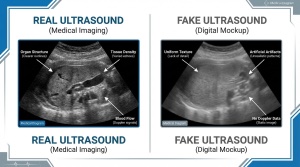
The grainy appearance is called “speckle noise” and it’s inherent to how ultrasound technology works. Sound waves bouncing off tiny structures create this textured appearance. It’s not a flaw—it’s actually part of what makes the image authentic. Digital photos don’t have this natural grain, which is one way to tell real ultrasounds from fakes.

What does it mean if areas are black on an ultrasound?

Black areas indicate fluid or empty space. Sound waves pass through fluid without bouncing back, so no signal returns to create an image. Amniotic fluid, the bladder, and stomach all appear black. Blood vessels and cysts also appear dark.

Why is my baby hard to see on the ultrasound?

Several factors affect image quality: maternal body composition, baby’s position, amount of amniotic fluid, and the quality of the ultrasound equipment. Early in pregnancy, the embryo is simply tiny. Later, the baby might be facing your back or curled in a position that obscures the view.

What are the bright white lines on an ultrasound?

Bright white areas are typically bones. The spine, skull, and long bones (femur, humerus) all appear bright white because dense bone reflects sound waves strongly. The brightness is directly related to tissue density.

Can you tell the gender from a standard ultrasound?

Yes, typically after 18-20 weeks with good accuracy. Earlier scans can sometimes give hints, but the anatomy is still developing. For boys, technicians look for the “turtle sign” or “hamburger sign” (male genitalia appearance). For girls, they look for the “three lines” representing the labia.

What’s the difference between GA and EDD on an ultrasound?

GA (Gestational Age) is how far along the pregnancy currently is, measured in weeks and days. EDD (Estimated Due Date) is the projected date of delivery, calculated as 40 weeks from the last menstrual period or adjusted based on measurements.

Why are measurements important on an ultrasound?

Measurements track fetal growth and development. They help ensure the baby is growing appropriately for gestational age and can detect potential issues early. They’re also used to estimate fetal weight and confirm or adjust due dates. For realistic fake ultrasounds, getting these measurements accurate for the stated gestational age is crucial.

Wrapping Up

Understanding ultrasound anatomy transforms those mysterious grayscale images into meaningful glimpses of development. Whether you’re an expecting parent trying to make sense of your scan, a student learning about fetal development, or someone interested in creating convincing novelty ultrasounds, knowing what each element represents is invaluable.

The more you look at ultrasound images, the easier they become to read. Those blurry shapes start to make sense, and suddenly you can pick out a foot or identify a profile view without anyone pointing it out.

Related Reading: